Showing posts with label Customizations. Show all posts

Saturday, December 12, 2009

Customize Dynamics CRM 4.0 entities print preview forms

(Changing the entity’s default print preview to a custom implementation)

One of the most annoying drawback which was raised by my clients ever since CRM 3.0, was the dull and inflexible print preview form of CRM entities. Needing to print out every day several types of records on such print previews and file them, turned out to be a real burden using the default print preview.

The main complaints were about:
- the layout of the print preview form is not customizable (layout, position of fields, adding or removing fields etc)
- the look (the design) cannot be customized (e.g. adding a company logo, colors, fonts, etc)
- the child collections’ information cannot be added to the print preview screen

One of the most efficient approaches to implement your own print preview page for any entity form is to perform the following steps:
1. create a custom CRM / SSRS report to be used as print preview for that entity
2. update the form.crm.htc file with a code which checks if there is a custom report defined for the current entity to be loaded instead of the default print preview. In case there is one, the customization will load that report page instead of running the default print preview page.

- Add in Global.js file an array with the entities supporting custom reports for print preview:

var PrintPreviewReports = new Array(); PrintPreviewReports[Lead] = "Print Leads"; //This is the report name


- Add the following code in the form.crm.htc at the beginning of Print() function:

if(PrintPreviewReports!=null && PrintPreviewReports[_oSubmitForm.crmFormSubmitObjectType.value]!=null) { RunReport(true, PrintPreviewReports[_oSubmitForm.crmFormSubmitObjectType.value], "", _oSubmitForm.crmFormSubmitObjectType.value, PrintPreviewReports[_oSubmitForm.crmFormSubmitObjectType.value]+".rdl", 1);}


The approach is rather simple for a developer; once the customization has been set in place and you have a first model for a report, then it should take about 30 minutes per each new report to implement in order to be used as entity print preview.

Here’s the sample screen for this solution in production:


That’s it. Let me know if you find this useful.

A+

Saturday, November 28, 2009

Dynamics CRM Grid customizations - virtually anything possible

(A quick guide on how to dynamically modify the look and content of a Dynamics CRM Grid)


Intro

For each project based on the CRM framework which I dealt with, I had plenty of customer requirements around the grids’ look & behaviors. I’m planning to briefly describe hereby some easy ways to implement some of the most requested customizations. Note that all these customizations are not supported nor compliant with MSCRM SDK.

One core functionality you’ll need to address in order to be able to implement my samples below and any others you might need around the grid, is to catch the load event of the grid control. Once you’re able to execute your custom function on grid loading event, you can then browse the document’s DOM and dynamically change the look and behavior of any document element including the grid itself.


The code

A simple way (not the cleanest, I admit) is to define in the /_static/_common/scripts/Globaj.js file an array of functions to be called when the appropriate grid loads:

var grid_onGridLoadDelegates = new Array();
grid_onGridLoadDelegates[New_invoice_line] = new_invoice_line_onBeforeGridLoad;

This code defines the array of functions and then have the function new_invoice_line_onBeforeGridLoad(...) called when a grid displaying entities of type “new_invoice_line” gets loaded.

Then, you’ll need to add several lines in the /_static/_grid/AppGrid_DefaultData.htc file, at the end of init() function:

if(grid_onGridLoadDelegates!=null && grid_onGridLoadDelegates[this.element.oname]!=null)
{ 
   grid_onGridLoadDelegates[this.element.oname].call(this, window, this.element);
}

Thus, you can already define like this your custom function to be executed when the grid is loaded:

function new_invoice_line_onBeforeGridLoad(parentWindow, grid)
{
...
}

That’s pretty much it! Here are below some examples based on this approach.


Examples

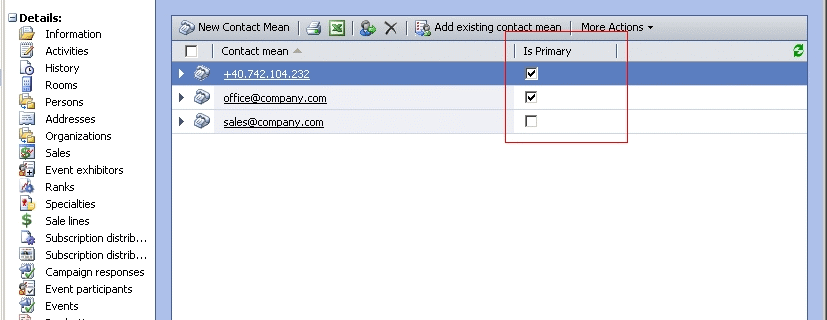
Have particular column for a boolean field replaced by checkboxes when the grid loads.


Implement a “Position” column where the numeric value is replaced by Up/Down arrows having actions which perform server side call for recomputing the line’s position and refresh the grid afterwards.


Have some fields in a column displayed in a variable look, depending on the cell value.


There you go. Let me know if you find this useful.

A+